
Diagnosing Performance issues with Vendure

Martijn
Performance issues are often complex, but hopefully this article will point you in the right direction when debugging your Vendure instance.
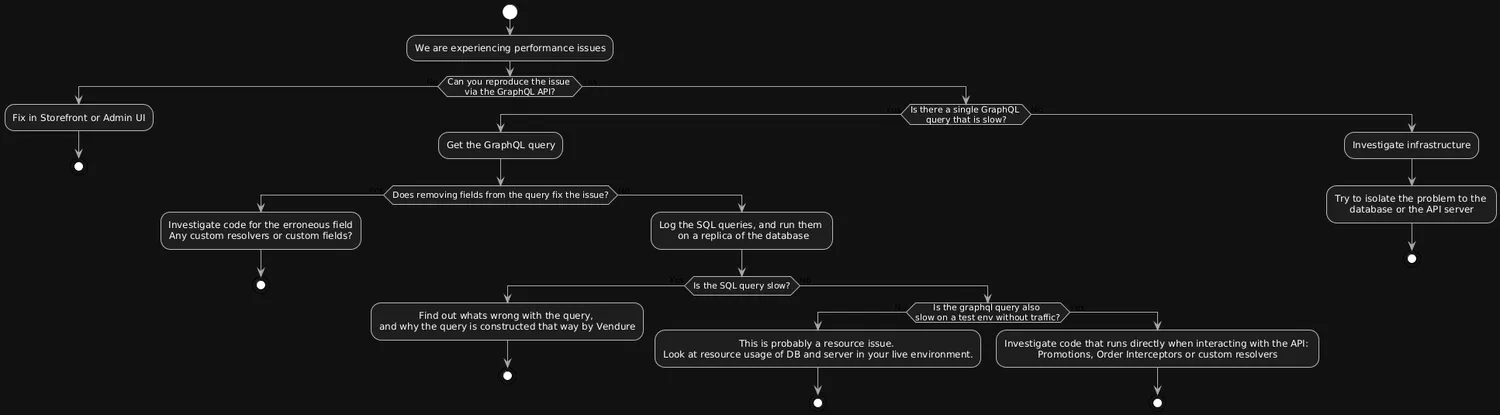
Performance debugging is hard: It requires knowledge and insights into both application code and infrastructure. But where should you start looking? This is by no means a complete guide to solve all performance issues, but I hope it helps you find where to begin.
Isolate the problem
The first step is to isolate the problem. Set aside your guesses and verify where the problem is:
- Can you reproduce the issue with just the GraphQL query, or is the problem in the Admin UI?
- Can you fix the problem by removing fields from the query? If so, the problem likely lies in custom fields or custom field resolvers.
- If removing fields does not solve the problem, you can enable the logging of all database queries in TypeORM.
- If these steps don't work, run your Vendure server locally and start debugging. Or, start adding
console.log()everywhere innode_modulesto find the offending code! - Only after these steps should you look at resources like RAM and CPU. Vendure is built with performance in mind, so most of the time raw server resources are not the issue.
The ideal outcome of this is that you can reproduce the issue locally, on a local database, without any external factors like live traffic or background tasks.
Common Causes
Below you will find the most common causes of a slow Vendure instance.
Custom Code
Extensibility is great, but it also allows you as a developer to break things. Vendure has many strategies to define your own business logic, often allowing you to do async work inside the strategy.
As a developer, you need to know where these strategies are used. Some strategies are called multiple times in a single add to cart action. Imagine fetching something from an external API six times every time a customer adds an item to the cart.
A common mistake is putting heavy code in any of these parts of Vendure:
- Custom Promotions - The promotions on an order are recalculated on every change made to an order.
- Order Interceptors - As the name implies, these interceptors are called on every add or remove action in the cart.
Custom Fields
Custom Fields are a powerful feature of Vendure but can slow down your server when used incorrectly.
- Custom relational fields with
eagerloading. When a relational custom field is set toeager: true, TypeORM will create an SQL query that always joins your custom field on the entity. Try to avoid eager loading and use it only when strictly necessary.
GraphQL Field Resolvers
GraphQL Field Resolvers are a great way to resolve a value on any given entity. For example, you can add the field relatedProduct on a Product, and in the resolver perform a database call to fetch related Products.
This can lead to the famous N+1 problem. In a list query where you fetch ten products, you may now need ten extra database calls to get the related products. You can use Dataloader to prevent this problem.
Storefront usage
We often see that the storefront reuses one big bulky query to, for example, render a product detail page server side. Although query reusability is nice in code, you are probably fetching a lot of fields that you are not using in your PDP. Some low-hanging-fruit tips:
- Only fetch the fields you actually display in the current page.
- Cache global data like Collections for navigation, so that you don't need to fetch all collections and child collections for each page load.
There are more complicated scenario's than this, but I hope this points you in the right direction. Most of the time, Vendure will run smoothly, but a periodical Vendure Audit is never a bad idea!